
Appearance
Introduction to Variables

In Situate, fields with this badge accept variables.
Variables are used to hold values that are passed from one place to another. All types of Situate variable abide by the same common stacking, scoping and naming behaviors.
Variable Names
Variables must start with a letter, dollar sign ($) or underscore (_), and can contain letters, numbers, dollar signs or underscores. By convention, the first letter of a variable is lowercase to help distinguish variables from upper case class names.
Acceptable variable names include:
- company
- x_10
- $10
Unacceptable variable names include:
- a b
- a-b
- 10x
Variable Stack and Scope
Certain variables are always available to workflows. They exist in a stack that starts at the workflow manager, goes down to workflows and then to each workflow instance, a running copy of an approved workflow.
Workflow instances can access the variables at the workflow and workflow manager level. Workflows can see the workflow manager level. A workflow cannot see the variables in a workflow instance. In Javascript terms, each level is a new function scope.
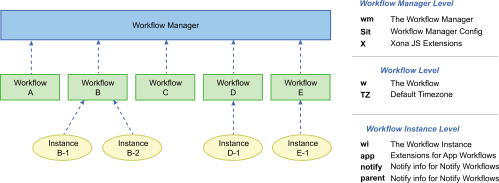
The variable stack allows workflows to directly interact with the Situate viewer. All variables in the stack exist as Javascript expressions that extend elements of the Javascript Workflow API.
Root-Level Variables
Situate creates one unique instance of each root-level variable. Each workflow sees the same instance of each root-level variable.
| Name: | Type: | Contains: |
|---|---|---|
| wm | WM | Information about workflow queues. |
| sit | SIT | Access to Situate configuration. |
| x | X | Extensions to Javascript created by XonaSoftware. |
Workflow-Level Variables
Each approved workflow has one unique instance of each workflow-level variable.
| Name: | Type: | Contains: |
|---|---|---|
| w | W | Information about a single workflow. |
| TZ | TZ | The default timezone for the workflow. |
Workflow Instance-Level Variables
Each running workflow instance contains a unique instance of each workflow instance-level variable
| Name: | Type: | Contains: |
|---|---|---|
| wi | WI | Information about a single instance of a workflow. |
| app | app | Extended information for Application workflows. |
| notify | notify | Address information passed by the notify mechanism. |
| parent | parent | The wi of the workflow which called the current workflow instance if the current workflow instance was called by a workflow task. |