
Appearance
User Prompts
User Prompts are a method available only to manual triggers which cause the workflow to prompt the user starting the workflow for information whenever the trigger is fired.
Prompt
The prompt field sets the caption of the input field that the user will be presented with when firing the trigger.
Default Value
A default value may be supplied to the field. When the trigger is fired, the default value will be pre-filled.
Kind
The user prompt variable type currently supports two types of response mechanism:
- String, which prompts the user for a string value.
- Combo Box, which prompts the user with a set of choices in a dropdown menu.
String
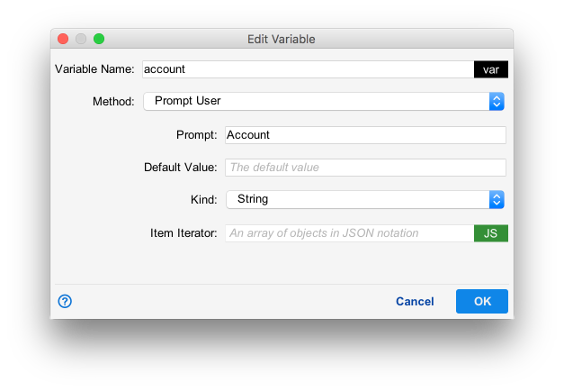
String user prompts create text fields for the user's response. The response is then stored as a string.

In the example above, when the trigger is fired, the user will be asked to enter a value for the prompt Account. The trigger defines the variable account and its value is set to the user's response.
Combo Box
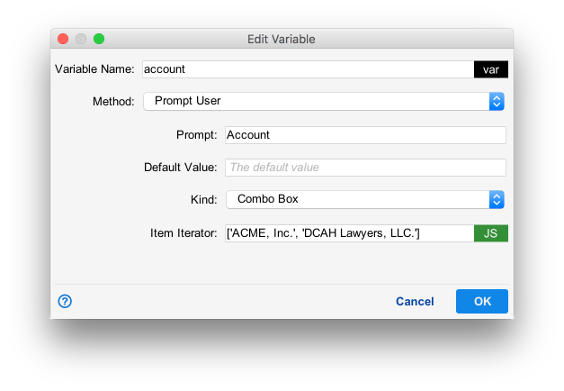
Combo Box prompts the user for one of a set of values as defined in the item iterator field. The elements of the Item iterator must be formatted as a Javascript array, and each element will be displayed as one option in the dropdown menu.
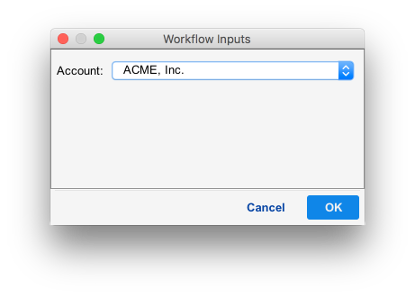
In the example above, the item iterator field contains a Javascript array of two values. When the trigger is fired, the user will be presented with these options.