
Appearance
Template Expansion with Javascript

In Situate, fields with this badge undergo template expansion.
Sometimes things are much more complex than simply escaping an expression. Template expansion allows more robust usage of Javascript inside fields, and allows much finer control of the script's output.
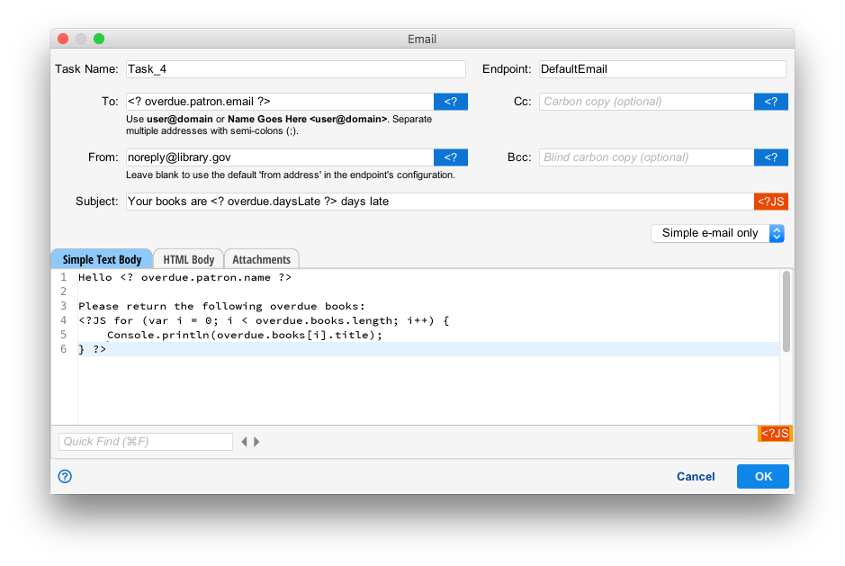
In the example above, a expression escape is used in the "To" and "Subject" fields and the first part of the "Message:", but a list of overdue books would be difficult to phrase as a single escaped string, so template expansion is used.
The use of <JS and ?> tell Situate to start and stop interpreting Javascript code. In the example, a for loop is used to iterate over each book, and Console.println() writes text into the document.
Template Model
<?JS and ?> define a template which is processed into text by template expansion.
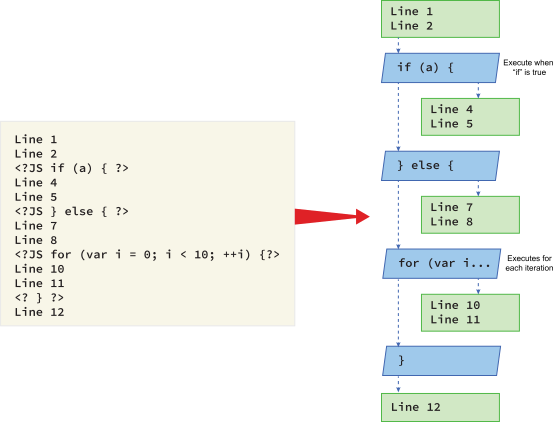
The graphic above demonstrates how template expansion breaks up a field into blocks of both text and code. Curly brackets anchor blocks of text to Javascript expressions, allowing the expressions selectively implement the anchored lines.
When the template is expanded, each block is proceessed from top to bottom. Text blocks are copied verbatim into the final output, and Javascript blocks are executed. Any text that Javascript blocks produce as a consequence of execution is copied to the final output.
Any text blocks anchored by Javascript blocks are conditionally executed. For example, the text block containing "Line 4" and "Line 5" will only be output when the if block in the first Javascript block evaluates to true. When the if block is false, the else block will output the text block containing "Line 7" and "Line 8".
Similarly, the for statement will output the text block including "Line 10" and "Line 11" each time it is iterated. Template expansion also accepts while and do-while statements in a similar manner.
Mixing Template Expansion and Expression Escape
Expression escape can be mixed with Javascript in template expansion. When expression escape is encountered, Situate considers the expression escape a part of the text block is parsing, and executes it after the expression escape is processed.
Output From Javascript Code
Javascript code can write text directly to the final output using the Console.print() or Console.println() functions. Console.print() sends the string passed directly to the output, while Console.println() sends the string appended with a newline character. Console.log() will send text to the debug output of the workflow.
Console.echo() is supported, but deprecated. It is equivalent to calling Console.println().
Whitespace
Just like with expression expansion, whitespace inside the <?JS and ?> operators is handled by Javascript.