
Appearance
Database
The database task can execute SQL statements and perform SQL queries against a database.
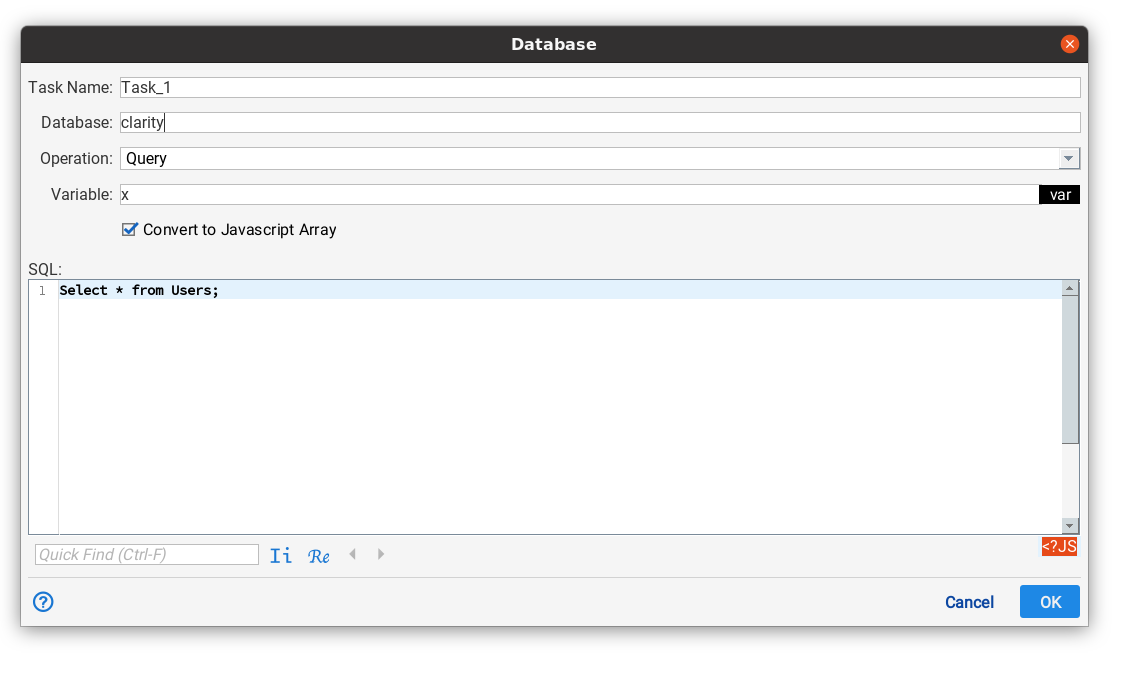
Database
The database field selects the database to be accessed. A database endpoint must be configured before hand. See Endpoints for more information.
Operation
Operation can be set to the following values.
| Query | Situate will perform an SQL query. The "variable" field will contain the name of a variable to receive the result. |
|---|---|
| Statement | Situate will execute an SQL statement. The variable field is not used. |
SQL
This field contains a text editor that allows a query or statement to be entered. It supports template expansion to allow access to Situate variables.
Query Results
There are two formats that can be assigned to the variable. If "Convert to Javascript Array" is selected, the results will look something like this:
javascript
x = {
   "totalRows": 10,
   "elapsedTime": 130,
   "objects": [
      {
         "user": "dave",
         "firstName": "dave",
         "lastName": "carnal"
      },
      {
         "user": "mikema",
         "firstName": "mike",
         "lastName": "mazzolini"
      }
   ]
}
The property objects is set to an array of objects with each property name being a column name.
If "Convert to Javascript" is not set, the results are similar to:
javascript
x = {
   "totalRows": 10,
   "elapsedTime": 130,
   "columns": [ "user", "firstName", "lastName" ],
   "data": [ [ "dave", "dave", "carnal" ], [ "mikema", "mike", "mazzolini" ] ]
}