
Appearance
ACLs and Security
All objects in Situate have an associated ACL or Access Control List. The ACL determine users' permissions regarding the object.
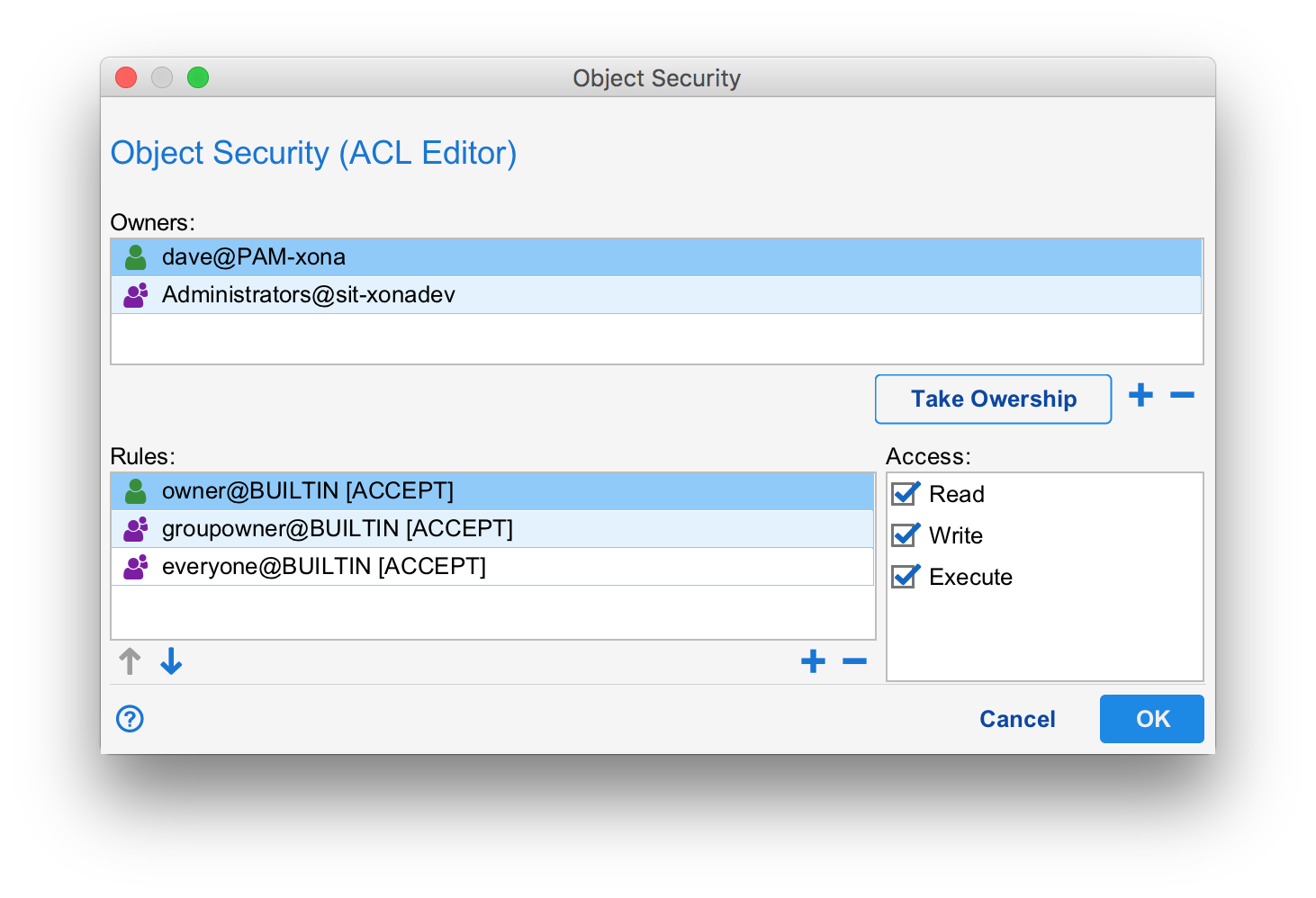
Owners
You can only edit the ACL on objects you own. Owners are listed in the "Owners" table. Members of the Administrators group can always edit an ACL. Typically, there is both a user owner as well as a group owner. In the example above, the ACL is owned by dave@PAM-xona and Administrators.
When a user creates a new object, the initial ACL will have a user owner equal to the creator's user and a group owner equal to the creator's default group. The default group is set in the user account under "User and Service Accounts" in the Object Browser.
If you have permission to do so, the set of owners can be modified using the "+" and "-" buttons below the Owners table. The "Take Ownership" button can be used to change the ownership to you. This can be handy when taking ownership of objects with bad ACLs. For example, objects owned by users that no longer exist.
Verbs
Before a user can perform an action on an object, the ACL is checked for access. ACLs typically secure "Read", "Write" and "Execute" verbs but others can exist in some cases. The particular action being performed will cause one or more verbs to be tested. For example, if a user wants to edit an asset's configuration, both "Read" and "Write" will be tested. Read because without read, the user should not even be able to see the asset configuration let alone edit it. Write because once the editing has been performed the user will want to save their work. The write ACL will be testing again at save time.
Rules
When a verb is checked, Situate goes down the ordered list of rules (from the "Rules:" table) testing each rule in turn. Every rule consists of an identify, an accept/deny action, and a set of selected verbs at the right. (When you select a rule row, the corresponding check boxes for each verbs in the "Access" section is updated.)
A rule is matched whenever the calling user has the identity mentioned in the rule (the caller is the user specified in the rule or is a member of the group specified in the rule) and the appropriate verb is selected. Once matched, the accept/deny action is performed. If "accept", then the caller passes the ACL test. If "deny", the caller fails that ACL test causing a Permission Denied error. If the entire rules list is scanned and no accept rule is matched, the ACL test fails.
The ACL test is performed for each required verb.
Changing Access
You can change the access check boxes for each verb by selecting the rule row and then checking or unchecking the boxes.
Adding or Removing Rules
You can add or remove rules by pressing the "+" or "-" button below the rules table. When adding, the following dialog is opened:
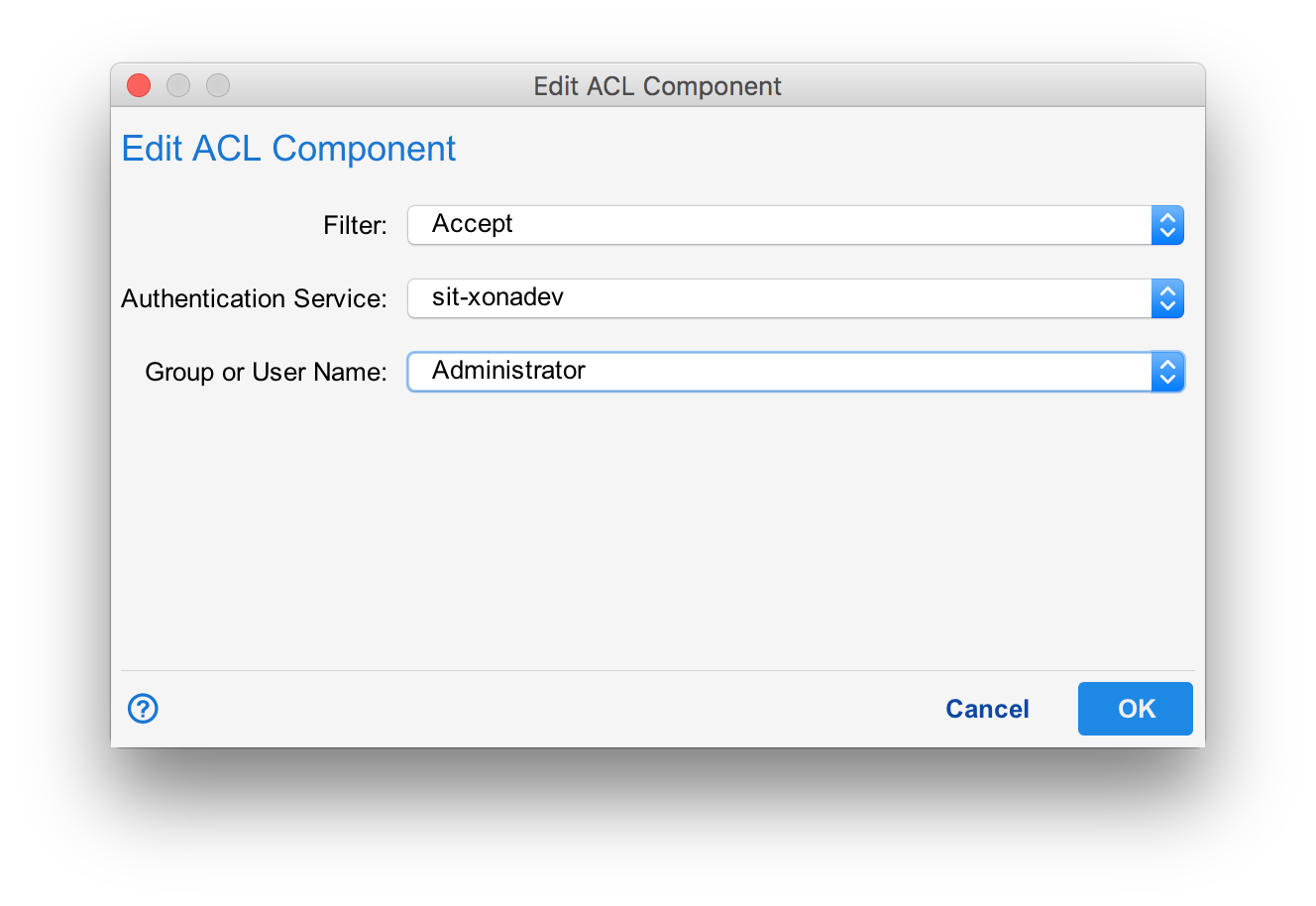
In the ACL Component dialog, there are two authentication services to choose from: The Situate domain's service (sit-your domain) and the "Builtin users/groups". The Situate auth service refers to the users in the Object Browser under "User and Service Accounts" and the groups in the "Domain Security" settings.
Builtin users/groups
The builtin authentication service links the ACL rule's identity to the ACL's owners. There are three choices:
| Owner | Any of the user owners of the ACL. |
|---|---|
| Group Owner | Any of the group owners of the ACL. |
| Everyone | All users. All users will match this identity. |
Similarity to UNIX Permissions
The builtin authentication service allows ACLs that resemble UNIX files permissions. Consider the following set of rules:
owner@builtin -> (Read, Write, Execute)
groupowner@builtin -> (Read, Write, Execute)
everyone@builtin -> (Read, Execute)
In UNIX, files are controlled by read, write and execute in three sections: owner, group and other. The rules above do exactly this and depict a UNIX permissions of 0775 or -rwxrwxr-x.
The builtin authentication service helps to simplify acls allowing an owner, group, other style of ACL to be constructed. Of course one can also add others, making it impossible to model as a simple UNIX permission.
Default ACLs
When a new object is created, a new, initial ACL is also created. This ACL is a little different depending on the kind of object being created. By default, the initial ACL will be:
owner@builtin -> (Read, Write, Execute)
groupowner@builtin -> (Read, Write, Execute)
everyone@builtin -> (Read)
0774 or -rwxrwxr-- in UNIX.
If the user's default group is SituateUsers, the initial ACL will become:
owner@builtin -> (Read, Write, Execute)
groupowner@builtin -> (Read)
everyone@builtin -> (Read)
0744 or -rwxrwxr-- in UNIX.
This difference is because SituateUsers is a catch-all group for "all users" or "everyone" and therefore is not suitable for a group owner because it duplicates the functionality of everyone@builtin.
User and Service Account ACLs
For users and service accounts, the default ACL is:
owner@builtin -> (Read, Write, Execute)
everyone@builtin -> (Read)
There is no group owner. The equivalent UNIX mode is 0744 or -rwx-r--r--.
Workflows
The initial ACL for a workflow will be:
owner@builtin -> (Read, Write, Execute)
groupowner@builtin -> (Read, Write, Execute)
everyone@builtin -> (Read)
Unless the user's default group is SituateUsers. In this case,
owner@builtin -> (Read, Write, Execute)
groupowner@builtin -> (Read, Execute)
everyone@builtin -> (Read, Execute)
0755 or -rwx-r-xr-x