
Appearance
Splits, Joins and Parallel Execution
The split and join tasks allow parallel execution. When a token reaches a split, each edge from the split is evaluated, and each satisfied edge receives a new token, creating subsequences. A subsequence begins at a split and ends at a matching join. Subsequences also end when there is no outgoing edge to follow.
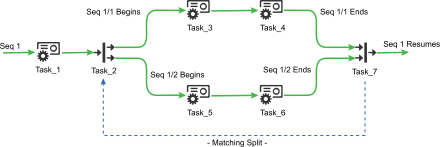
In this example, the split Task_2 receives the token from the initial sequence [1]. The edges to Task_3 and Task_5 are both satisfied, so new subsequences [1/1] and [1/2] are created. New tokens are created at Task_2 and proceed to Task_3 and Task_5. Both tokens advance independently until they reach Task_7. By default, the join then waits for all subsequences to complete before allowing sequence [1] to continue.
Sequence Notation
In Situate, the first sequence is always sequence [1]. Subsequences are each numbered, and categorized by depth. [1/1], [1/2] and [1/3] are the first three subsequences of sequence [1]. Nested splits continue to add sub-subsequences by depth, allowing sequences like [1/1/1], [1/1/2] and [1/1/1/1].
Matching Splits and Joins
The dashed line marked "matching split" in the example above indicates that the split Task_2 is matched with the join Task_7. Subsequences must be matched in this way to validate correctly, else they become non-contributing sequences. A matching split is selected in the join's configuration dialog.
Success and Failure
A matched split and join pair always share the same status, based on the final status of their subsequences. When every subsequence that ends at a join succeeds, the split and join succeed. If one or more subsequences within the group fail, the split and join fail.
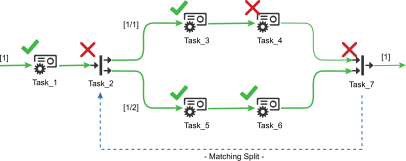
In the example above, Task_4 fails. This causes subsequence [1/1] to fail, making Task_2 and Task_7 fail. Sequence [1] will fail if there is no edge from Task_7 that is satisfied on failure.
Non-contributing (Open) Sequences
When a subsequence is not connected to a join, it will not contribute to the status of the split and join.
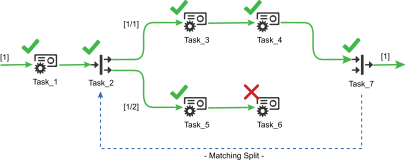
In the example above, subsequence [1/2] is not connected to Task_7. Because [1/2] is not a contributing subsequence, the status of Task_2 and Task_7 is not affected by the failure of Task_6. Since subsequence [1/1] succeeds, Task_2 and Task_7 succeed.
Creating a Split
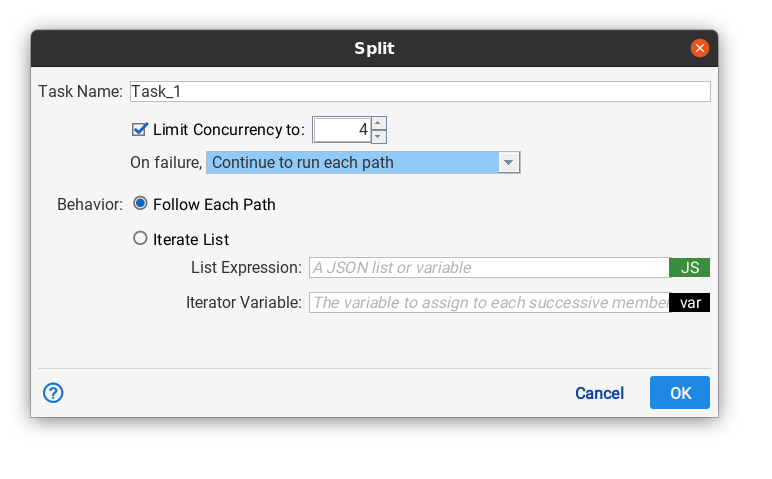
A split is created by the split task. Its configuration is shown above.
Behavior
There are two behaviors "Follow Each Path" causes the split to act as described above. "Iterate List" is discussed below in "Splits as Iterators".
Limit Concurrency
When checked, no more than the configured number of subsequences can be active at any given time.
On Failure
The on failures drop down controls how the split behaves whenever one of the subsequences fails.
Continue to run each path. Even though one of the subsequences has failed, Situate will start all of the subsequences. The split/join will fail after all subsequenes have been run.
Don't run more paths. If this option is selected, Situate will not start any subsequences that have not already been started. It will wait for all the running subsequences to complete, then the split/join will fail.
Don't run more and cancel running. When one of the subsequences fails, Situate will cancel all the other running subsequences. No additional subsequences will be started. When all the running subsequences have entered the canceled state, the split/join will fail.
Sequence Merging Behavior
By default, a join will wait for all connected subsequences to complete, but this not always desirable.
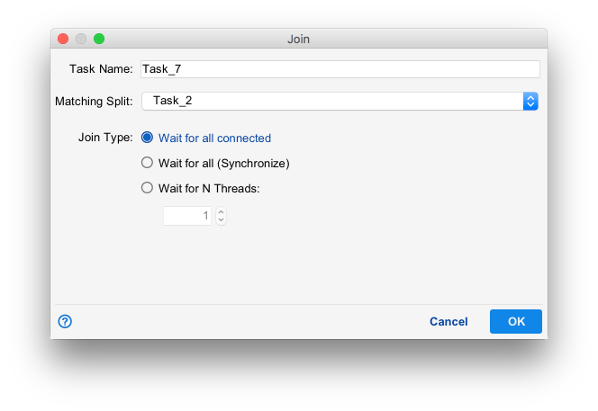
The join type determines how a join controls token flow as subsequences terminate.
Wait for all connected is the default join type. Once all contributing subsequences complete, the sequence which triggered the split will continue at the join. The join will not wait for non-contribuing sequences.
Wait for all (Synchronize) is similar to wait for all connected except that the join will wait for both contributing and non-contributing sequences to complete before continuing.
Wait for N Threads causes the join to wait for a configured number of successful subsequences before continuing. Wait for N joins are sometimes referred to as M-of-N joins.
Discriminating Joins
A discriminating join is a join that only waits for the first sub-sequence before continuing. A discriminating join is created by selecting "Wait for N Threads" and setting the number to wait for to 1.
Missing Join Task
When no subsequence of a split ends at a join, the overall sequence is treated as if each subsequence was connected to one join for the purposes of determining the success or failure of the initiating split.
Splits as Iterators
In addition to parallel execution, splits are also able to run subsequences with each value in a list of variable values.
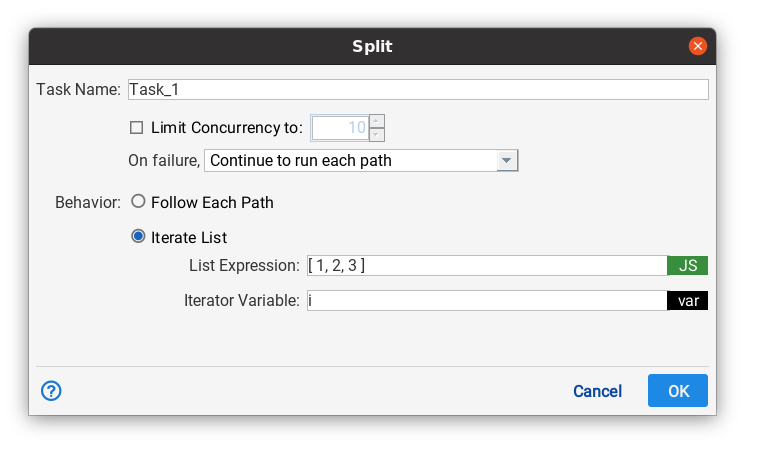
When "Behavior" is set to "Iterate List", Situate executes the split's subsequence once for each given element of a Javascript expression which evaluates to a list.
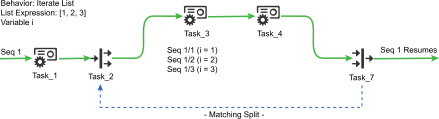
In this example, Task_2 is configured with a list of three values for the variable i. When the token reaches Task_2, three new subsequences are created and a new function scope is started. i is defined in each subsequence as its corresponding value in the list.
Cancel and Split/Join
When a workflow is canceled, the initial sequence will be requested to cancel. If a split is executing when the cancel request occurs, the split propagates the request to cancel to each of its attached subsequences. Each subsequence cancels individually, and only when all contributing subsequences are canceled are the split and join considered canceled.
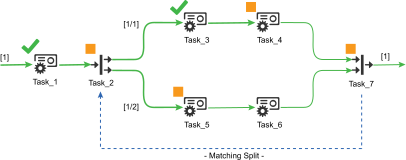
In this example, the workflow was canceled after Task_2 executed. The two subsequences were then canceled by Task_2. Task_5 and Task_4 were running at the time, and canceled successfully. Task_6 never runs. Once sequence [1/1] and [1/2] had canceled, the split and join became canceled, causing sequence [1] to become successfully canceled.