
Appearance
Tasks, Tokens and Sequences
Tasks
A task is one unit of work within a workflow. Tasks are joined together with edges to form a sequence.
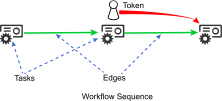
Workflows are administered by the token, a pointer that moves from task to task along edges. When a particular task gets the token, it executes. When a task completes, it releases the token. The token then advances along an edge to another task. When the token cannot advance, the sequence terminates.
Triggers
Each sequence in a workflow begins with a trigger. When a trigger's set conditions are met, it fires. Firing a trigger creates a token, which begins a sequence.
Common triggers include:
- The Manual Trigger, which allows a user to start a workflow manually.
- The Schedule Trigger, which starts a workflow at scheduled time.
- The Workflow Trigger, which allows one workflow to start another.
For a complete list of triggers, see Triggers.
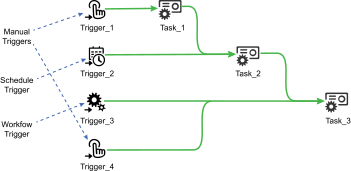
In this example, the same workflow can be manually fired at either of the manual triggers, automatically fire at the times defined by the schedule trigger, or can be fired by another workflow at the workflow trigger. Multiple triggers can be used to start the token in different locations within the same sequence.
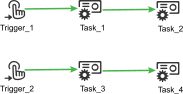
It is also possible to have triggers that point to completely unrelated sequences within the same workflow.
Edges
Edges direct the movement of the token through the workflow. Edges will only affect the token when they are satisfied because their condition is met. The most common edge is the basic edge, whose condition is satisfied based upon the final status of the preceding task. Basic edges may be configured to be satisfied when the preceding task's final status was "Succeeded", "Failed", or "Completed".
For a complete list of all types of edges, see Edges.
Success and Failure
Every task will fail or succeed. A sequence succeeds whenever there are no edges that can be followed and the last task was successful.

In this diagram, the last task in the sequence succeeds so the sequence also succeeds.

In this diagram, Task_2 has failed. There is an outgoing edge, but its condition is only satisfied when Task_2 succeeds. Because there are no satisfied outgoing edges, the token cannot advance and the sequence terminates. Since the last task in the sequence fails, the sequence also fails.

In this diagram, Task_2 fails. Since its outgoing edge is satisfied on failure, the token advances to Task_3. Since Task_3 succeeds and has no outgoing edges, the sequence terminates and succeeds.

In this diagram, Task_2 succeeds. There is an outgoing edge, but it is only satisfied when Task_2 fails. Because the outgoing edge is not satisfied, the sequence terminates at Task_2, and Task_3 does not receive the token. Since the last task in the sequence succeeds, the sequence also succeeds.
Success and Failure of the Entire Workflow
When the sequence started by a trigger succeeds or fails, the workflow terminates with the status of that sequence. When workflows contain multiple sequences or subsequences, the workflow's exit status will be determined by the status the sequence started by the trigger that was fired.
Canceling Workflows
A workflow may be canceled to stop it before it would terminate naturally. When a workflow is canceled, it enters the canceling state and sends a cancel request to the sequence started by the trigger. When the sequence receives this request, it asks the currently executing task to cancel.
Each different task responds to a cancel request differently. A delay task will simply stop waiting and enter the canceled state right away while a remote execution task many need to kill its child process first. Each task's cancel behavior is documented along with the task in the task catalog.
Once the sequence transitions from canceling to canceled, the workflow's state becomes canceled as well.

In this example, the workflow has been canceled during Task_2. This causes Task_2 to cancel, and the workflow to terminate with the "Canceled" status.